
Showing posts with label Tricks. Show all posts
Showing posts with label Tricks. Show all posts
Create A Personal Screen Saver In Win Xp!

Change The Default Location For Installing Apps

-----------------------------------------------
As the size of hard drives increase, more people are using partitions to separate and store groups of files.
XP uses the C:\Program Files directory as the default base directory into which new programs are installed. However, you can change the default installation drive and/ or directory by using a Registry hack.
Change Text on XP Start Button

In order to make the changes, the file explorer.exe located at C:\Windows needs to be edited. Since explorer.exe is a binary file it requires a special editor. For purposes of this article I have used Resource Hacker. Resource HackerTM is a freeware utility to view, modify, rename, add, delete and extract resources in 32bit Windows executables and resource files (*.res). It incorporates an internal resource script compiler and decompiler and works on Microsoft Windows 95/98/ME, Windows NT, Windows 2000 and Windows XP operating systems.
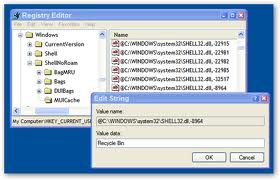
How to Rename the Recycle Bin
Send Sms From Friends MobileTo Any Number
Hello Friends, today i am sharing an awesome trick with you all. Today i will tell you how to send anonymous SMS i.e. How to send SMS
from any mobile number to any mobile number that means how to send SMS
from your friend's mobile to your mobile or your friends mobile to your
friends mobile or any other number. Basically this technique is call
SMS spoofing. By SMS spoofing we can send SMS to any mobile using
anyone's mobile number. How this trick can be helpful?? its simple it
is helpful when you wanna prank your friends, enemies or simply you
want to send free SMS to your friends using their numbers only. So friends read on...
What is SMS Spoofing?
Spoofing
is basically mimic of the original i.e. SMS spoofing basically is a
technique to send anonymous SMS to any mobile number. By anonymous i
means that we can use any mobile number to send the SMS.
This is
not actually a trick or hack but it's a service that a company is
providing but the only thing the company forgot is internal send ID
Check i.e. which number we are using to send SMS. So this service
allows us to send SMS from any number to any number that means. Now the
number that we register will be shown to the victim.
Hence we are exploiting the Internal sender ID phone verification feature.
How to get money from Adsense


While we can't guarantee results, of course, since a lot of your success lies in your own hands, we wouldn't have written this article if we didn't believe in the power of Google AdSense. A lot of webmasters are making a lot of money off of AdSense, and there's no reason you shouldn't be one of them.
The amount of money you can make with Google AdSense mainly depends on what user needs your Website fills. For instance, a site about women's issues can make some serious bucks on AdSense because of the high level of competition for related keywords.
10 Big mistakes

Before creating an adsense account realize this thing in your mind that you never ever this guys or make fraud with Google and please try to avoid the below describe 10 Major mistakes.
1. Don't click on your own ads. Because 70% of the peoples has been banned due to clicking on their own ads. In Google's terminology it is said "Invalid Clicks".
2. Also make sure that you are not in the black list before creating new adsense account. It will make you more difficult to survive in Google's world and your account 100% sure will banned.
3. One account is enough for many websites suppose you have two hundred websites then one account will meet the requirement as like single account. Google has given the permission to put your ads on any website.
How to increase income from Google Adsense?

Did you know that the standard Google AdSense advert is not the best and most effective one?
If you've been using Google AdSense already, you'll know that there are
different advert formats that you can try on your website.
The
most important thing that you can do to improve your Google AdSense
income is to increase the click-through rate or CTR For
example,
How Increase Traffic?

1-Submit Your website or blog to search engines. If you can not submit your site to all search engines,
2-Submit
Your website or blog to web directories. There are so many free and
paid web directories. One of the top free web directory is Directiories where you can submit your site free.
3-Introduce your website to community forums and enter your site in the signature place.
4-Exchange
Links with high traffic and page rank sites. Almost sites require
reciprocal links. Place their link on your sites and putyour site or
blog to their sites. To exchange link with us, Click here.
Remove MSN Messenger from XP

First of all you can try what Microsoft Suggests:
CODE
http://support.microsoft.com/?kbid=302089
===================================================================
then you may try some more ways of removing MSN.
I am not responsible for the use or the misuse of this information.
Use at your own risk.
0rkut tricks
 I recommend u doing all the tricks on Opera Browser
.. it supports java scripts the most efficient way.
No need to install Ny "greesymonkey" scripts.. it works well wid all the browsers.
Click here for new updated tricks
ALL NEW MOBILE UNLOCK CODE

SAMSUNG
t 209 unlock 100%ok
try it:Make sure to use a SIM card that is not accepted by that phone!
Enter reset code first?
*2767*3855# let it reboot
then enter...
*7465625*638*00000000*00000000# (to change NCK code to 00000000)
then enter...
#7465625*638*00000000# (to permanently unlock the phone
How to use the Google calculator

Google’s calculator tries to understand the problem you are attempting to solve without requiring you to use special syntax. However, it may be helpful to know the most direct way to pose a question to get the best results. Listed below are a few suggestions for the most common type of expressions (and a few more esoteric ones).
Most operators come between the two numbers they combine, such as the plus sign in the expression 1+1.
Operator Function Example
+ addition 3+44
- subtraction 13-5
* multiplication 7*8
/ division 12/3
^ exponentiation (raise to a power of) 8^2
% modulo (finds the remainder after division) 8%7
choose X choose Y determines the number of ways of choosing a set of Y elements from a set of X elements 18 choose 4
th root of calculates the nth root of a number 5th root of 32
% of X % of Y computes X percent of Y 20% of 150
Some operators work on only one number and should come before that number. In these cases, it often helps to put the number in parentheses.
Operator Function Example
sqrt square root sqrt(9)
sin, cos, etc. trigonometric functions (numbers are assumed to be radians) sin(pi/3)
tan(45 degrees)
ln logarithm base e ln(17)
log logarithm base 10 log(1,000)
A few operators come after the number.
Operator Function Example
! factorial 5!
Other good things to know
You can force the calculator to try and evaluate an expression by putting an equals sign (=) after it. This only works if the expression is mathematically resolvable. For example, 1-800-555-1234= will return a result, but 1/0= will not.
Parentheses can be used to enclose the parts of your expression that you want evaluated first. For example, (1+2)*3 causes the addition to happen before the multiplication.
The in operator is used to specify what units you want used to express the answer. Put the word in followed by the name of a unit at the end of your expression. This works well for unit conversions such as: 5 kilometers in miles.
You can use hexadecimal, octal and binary numbers. Prefix hexadecimal numbers with 0x, octal numbers with 0o and binary numbers with 0b. For example: 0x7f + 0b10010101.
The calculator understands many different units, as well as many physical and mathematical constants. These can be used in your expression. Many of these constants and units have both long and short names. You can use either name in most cases. For example, km and kilometer both work, as do c and the speed of light.
Feel free to experiment with the calculator as not all of its capabilities are listed here. To get you started, we’ve included a few expressions linked to their results.
1 a.u./c
56*78
1.21 GW / 88 mph
e^(i pi)+1
100 miles in kilometers
sine(30 degrees)
G*(6e24 kg)/(4000 miles)^2
0x7d3 in roman numerals
0b1100101*0b1001
More info on
Ultimate Google Way

Look for Appz in Parent Directory
intext:"parent directory" intext:"[EXE]"
intext:"parent directory" index of:"[EXE]"
intext:"parent directory" index of:"[RAR]"
Get the serial number you need !
 Get the serial number you need ! (For Certain Things)
* Go to Google.
* In the search field type: "Product name" 94FBR
* Where, "Product Name" is the name of the item you want to find the serial number for.
* And voila - there you go - the serial number you needed.
Google secrets

?ww.google.com
put this string in google search:
"parent directory " /appz/ -xxx -html -htm -php -shtml -opendivx -md5 -md5sums
"parent directory " DVDRip -xxx -html -htm -php -shtml -opendivx -md5 -md5sums
"parent directory "Xvid -xxx -html -htm -php -shtml -opendivx -md5 -md5sums
"parent directory " Gamez -xxx -html -htm -php -shtml -opendivx -md5 -md5sums
"parent directory " MP3 -xxx -html -htm -php -shtml -opendivx -md5 -md5sums
"parent directory " Name of Singer or album -xxx -html -htm -php -shtml -opendivx -md5 -md5sums
Notice that i am only changing the word after the parent directory, change it to what you want and you will get a lot of stuff.
Google Tips & Tricks, (utilizing search engine)

Utilizing search engines
So much information is on the web, its mind boggling. Thankfully we have search
engines to sift through them and catagorize them for us. Unfortunatly, there is still so
much info that even with these search engines, its often a painstakingly slow process
(something comparable to death for a hacker) to find exactly what you're looking for.
How to use the Google calculator

Google’s calculator tries to understand the problem you are attempting to solve without requiring you to use special syntax. However, it may be helpful to know the most direct way to pose a question to get the best results. Listed below are a few suggestions for the most common type of expressions (and a few more esoteric ones).
Search For Ebook Server With Google.com

Here are some tips to helps you find eBooks with Google:
Get Hidden Secret Pages insted of Google search.

Subscribe to:
Posts (Atom)